> ## Documentation Index
> Fetch the complete documentation index at: https://docs.postiz.com/llms.txt
> Use this file to discover all available pages before exploring further.
# The calendar
> Day, week, month and list views, and how to filter them
**Where:** the Calendar section, the app's home screen
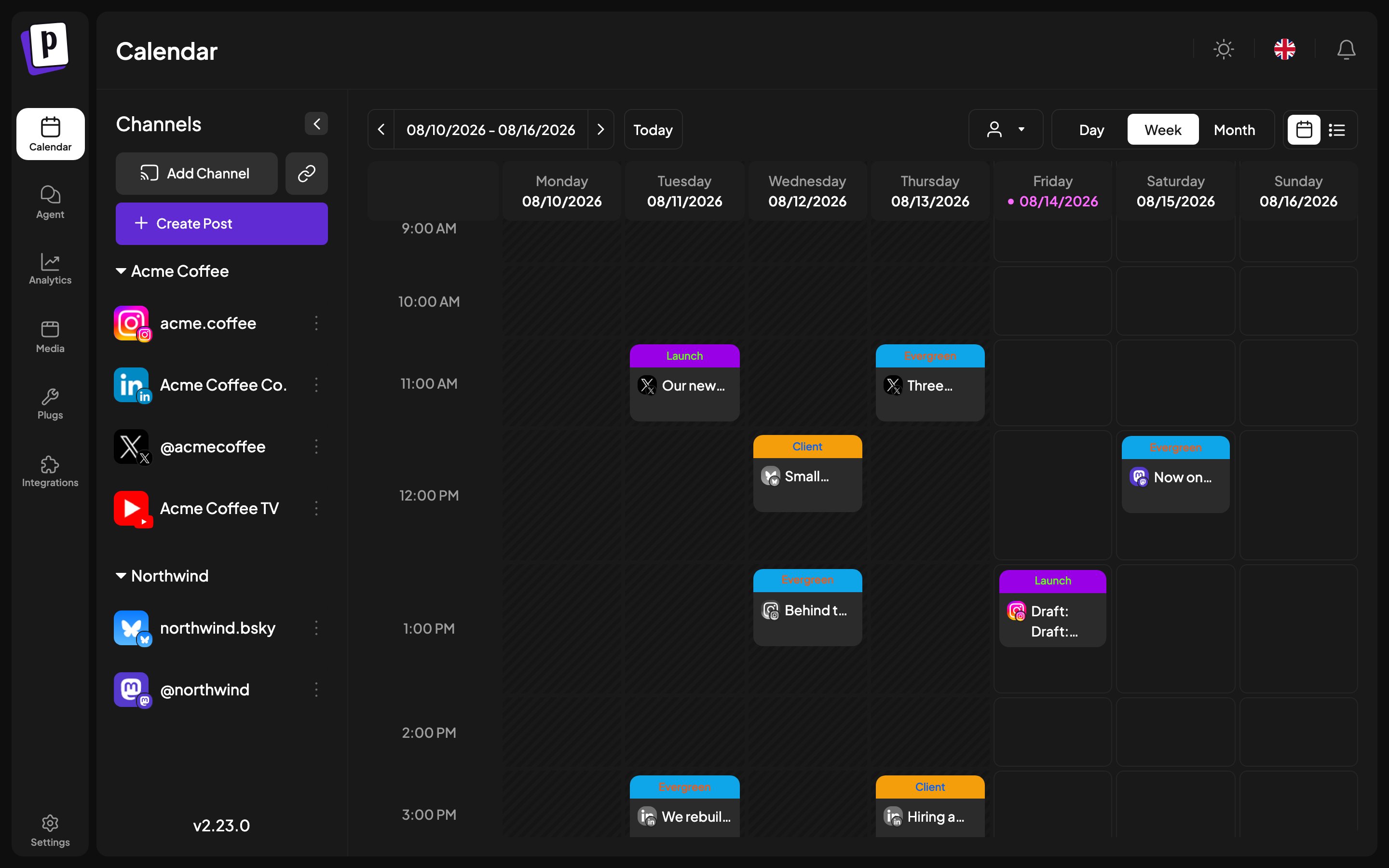
The calendar is both the plan and the record: scheduled posts, drafts and
published posts all sit on the same grid.
 ## Views
| View | What it shows |
| --------- | -------------------------------------------------------------------------------- |
| **Day** | Rows built from your channels' time slots, plus any time that already has a post |
| **Week** | Seven columns, 24 hourly rows |
| **Month** | A six by seven grid. Clicking a day opens the composer on that day |
| **List** | Posts grouped by date, paginated, with state filters |
Day view is the one worth understanding. Its rows are not every hour, they are
your [time slots](/general/channels/time-slots), so the day reads as a plan
rather than a wall of empty hours.
List view swaps the view switcher for state filters: **All**, **Scheduled**,
**Draft**, **Published**, 100 posts per page. It is the fastest way to answer
"what is still a draft".
Your chosen view is remembered between sessions, and it is in the URL, so you
can bookmark or share a specific week.
## Filtering by client
When you have more than one [customer](/general/channels/customers), a customer
selector appears in the toolbar. Picking one filters the calendar to that
client's channels only.
## Reading a post card
* **Colour** comes from the post's first [tag](/general/composer/scheduling).
* **`Draft:`** prefix means it will never publish.
* **A red ring** means it failed. The error is in the tooltip.
* **Struck-through and unclickable** means the slot is in the past.
* **"+ Show more (N)"** appears when a cell holds more than three posts.
## Creating a post from the calendar
Click any empty slot and the composer opens with that time filled in. Past
slots are not clickable.
If you have [sets](/general/settings/reusables), Postiz asks whether to start
from one before opening the composer.
## Post actions
Hover a post card for **Duplicate**, **Preview**, **Statistics** and
**Delete**. See [Post actions and statistics](/general/posts/actions-and-stats).
## The channel sidebar
The left sidebar lists your channels, grouped by customer where you have set
that up. From here you add channels, open the channel menu, create a post, and
reach the AI post generator.
Group headings collapse, and the whole sidebar collapses, which is worth doing
once you have a lot of channels.
## Views
| View | What it shows |
| --------- | -------------------------------------------------------------------------------- |
| **Day** | Rows built from your channels' time slots, plus any time that already has a post |
| **Week** | Seven columns, 24 hourly rows |
| **Month** | A six by seven grid. Clicking a day opens the composer on that day |
| **List** | Posts grouped by date, paginated, with state filters |
Day view is the one worth understanding. Its rows are not every hour, they are
your [time slots](/general/channels/time-slots), so the day reads as a plan
rather than a wall of empty hours.
List view swaps the view switcher for state filters: **All**, **Scheduled**,
**Draft**, **Published**, 100 posts per page. It is the fastest way to answer
"what is still a draft".
Your chosen view is remembered between sessions, and it is in the URL, so you
can bookmark or share a specific week.
## Filtering by client
When you have more than one [customer](/general/channels/customers), a customer
selector appears in the toolbar. Picking one filters the calendar to that
client's channels only.
## Reading a post card
* **Colour** comes from the post's first [tag](/general/composer/scheduling).
* **`Draft:`** prefix means it will never publish.
* **A red ring** means it failed. The error is in the tooltip.
* **Struck-through and unclickable** means the slot is in the past.
* **"+ Show more (N)"** appears when a cell holds more than three posts.
## Creating a post from the calendar
Click any empty slot and the composer opens with that time filled in. Past
slots are not clickable.
If you have [sets](/general/settings/reusables), Postiz asks whether to start
from one before opening the composer.
## Post actions
Hover a post card for **Duplicate**, **Preview**, **Statistics** and
**Delete**. See [Post actions and statistics](/general/posts/actions-and-stats).
## The channel sidebar
The left sidebar lists your channels, grouped by customer where you have set
that up. From here you add channels, open the channel menu, create a post, and
reach the AI post generator.
Group headings collapse, and the whole sidebar collapses, which is worth doing
once you have a lot of channels.