> ## Documentation Index
> Fetch the complete documentation index at: https://docs.postiz.com/llms.txt
> Use this file to discover all available pages before exploring further.
# Connect a channel
> The four ways a platform connects, and what to do when one fails
**Where:** Calendar, left sidebar, **Add Channel**
A channel is one connected social account. Everything else in Postiz, the
calendar, the composer, analytics, hangs off channels, so this is the first
thing you do.
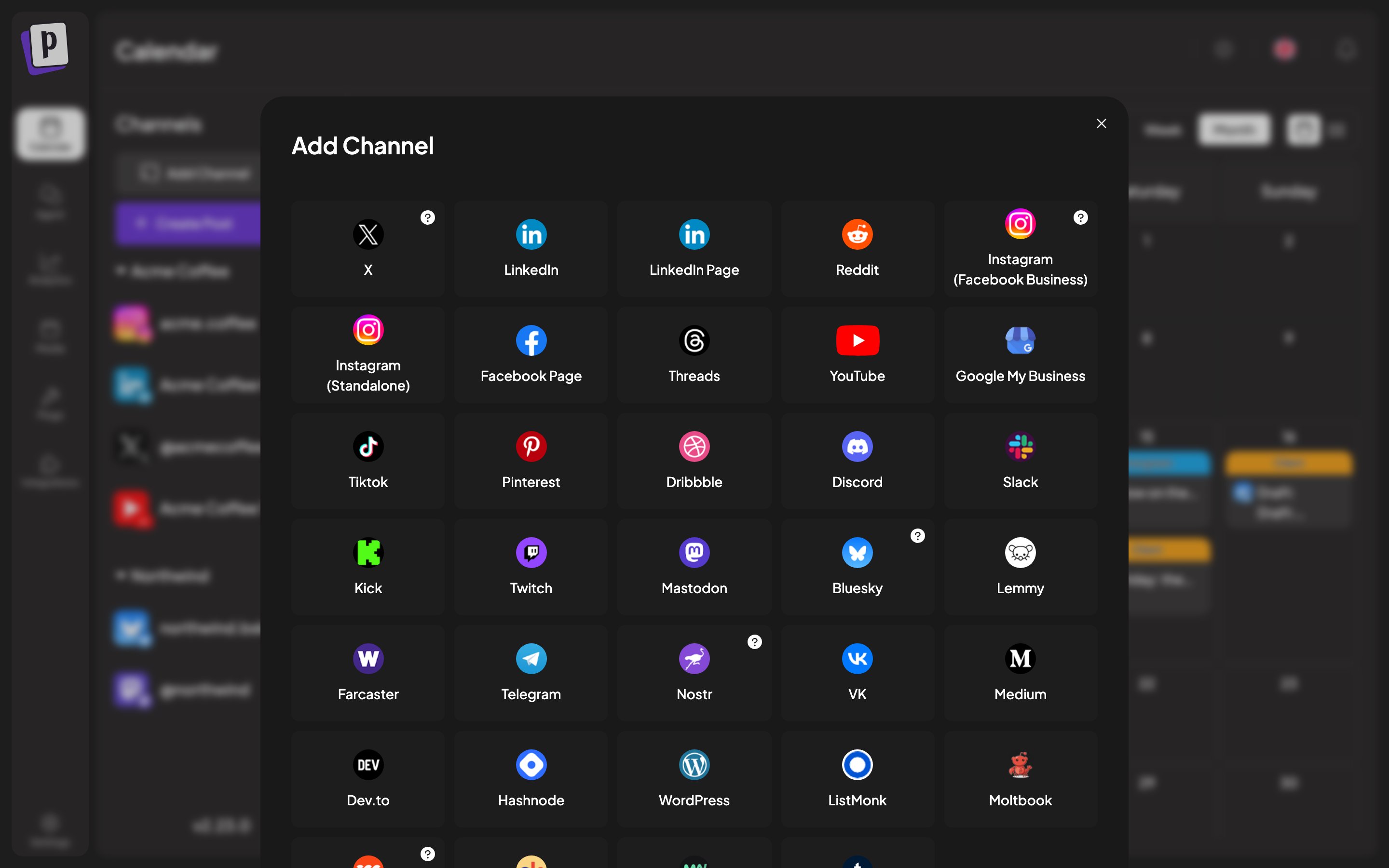 ## The four connection flows
Which one you get depends on the platform, not on a setting. The **Add
Channel** dialog picks automatically.
The common case: X, LinkedIn, Facebook, Instagram, YouTube, TikTok,
Reddit, Pinterest, Discord, Slack and most others.
You click the platform, get sent to the platform's own authorisation
screen, approve, and land back in Postiz with the channel connected.
Some platforms then ask a follow-up question, because one account can
contain several destinations. Facebook asks which Page, YouTube which
channel, Tumblr which blog, LinkedIn Page which company. Postiz calls this
a "continue integration" step and the channel is not usable until you
finish it.
Bluesky, Lemmy, Nostr, Medium, Dev.to, Hashnode, WordPress and Listmonk
ask you for credentials directly, in a form inside Postiz. There is no
redirect and no developer app.
What each one wants:
| Platform | Fields |
| ------------------------ | --------------------------------------------------------------------- |
| Bluesky | Service URL (defaults to `https://bsky.social`), handle, app password |
| Lemmy | Instance URL (defaults to `https://lemmy.world`), username, password |
| Nostr | Private key |
| Medium, Dev.to, Hashnode | API key |
| WordPress | Site domain, username, application password |
| Listmonk | URL, username, password |
Use an **app password** where the platform offers one, not your account
password. Bluesky and WordPress both provide these, and they can be
revoked without locking you out of the account.
Credentials are stored encrypted. To change them later, use **Update
Credentials** in the channel menu.
Telegram, Farcaster and Moltbook connect through a platform-specific step
inside Postiz rather than a standard redirect. Follow the prompts in the
dialog.
Telegram in particular connects a **bot** to a group or channel, so you
add the Postiz bot to the destination and it appears as a channel.
Some platforms have no public posting API. Skool is the current example.
Postiz connects to them through the **Postiz browser extension**, which
reads your existing logged-in session from your browser and passes it to
Postiz.
You need the extension installed, and you need to be logged in to the
platform in the same browser. If Postiz cannot reach the extension you
get **Extension Not Found** with an install link.
Postiz shows a **Browser Extension Notice** before you continue. Using
session cookies to post can violate a platform's terms of service, and
the connection breaks whenever the platform logs you out. Cookies refresh
automatically every 24 hours while it works.
## Letting a client connect their own account
You do not have to hold a client's password. The button next to **Add
Channel** generates an **invite link** you can send them. They open it,
authorise their own account, and the channel lands in your organisation.
Invite links only cover platforms that redirect cleanly, so platforms needing
an instance URL, custom credentials or the browser extension are excluded from
that list. See [Client groups and invite links](/general/channels/customers).
## After connecting
The channel appears in the left sidebar with its avatar. Two markers are worth
knowing:
* **A red exclamation** means the channel needs attention. Usually the token
expired and it needs reconnecting, sometimes an unfinished setup step.
* **Faded out at half opacity** means the channel is disabled.
## When a connect fails
Every platform should be connectable. If one consistently fails,
report it in [Discord](https://discord.postiz.com).
Postiz lists every platform whether or not its keys are configured, so
a platform that always fails to connect is usually one whose developer
app was never registered. See
[Provider API keys](/self-host/providers/overview).
The security token that ties the redirect back to your session was lost,
usually to a privacy extension or a second browser tab. Start over in one
fresh tab. Full detail in
[OAuth and channel connect errors](/general/troubleshooting/oauth-connect).
Check whether the platform requires an extra approval step for API
posting. Several platforms only allow posting to accounts explicitly
added as testers until the developer app is reviewed.
## The four connection flows
Which one you get depends on the platform, not on a setting. The **Add
Channel** dialog picks automatically.
The common case: X, LinkedIn, Facebook, Instagram, YouTube, TikTok,
Reddit, Pinterest, Discord, Slack and most others.
You click the platform, get sent to the platform's own authorisation
screen, approve, and land back in Postiz with the channel connected.
Some platforms then ask a follow-up question, because one account can
contain several destinations. Facebook asks which Page, YouTube which
channel, Tumblr which blog, LinkedIn Page which company. Postiz calls this
a "continue integration" step and the channel is not usable until you
finish it.
Bluesky, Lemmy, Nostr, Medium, Dev.to, Hashnode, WordPress and Listmonk
ask you for credentials directly, in a form inside Postiz. There is no
redirect and no developer app.
What each one wants:
| Platform | Fields |
| ------------------------ | --------------------------------------------------------------------- |
| Bluesky | Service URL (defaults to `https://bsky.social`), handle, app password |
| Lemmy | Instance URL (defaults to `https://lemmy.world`), username, password |
| Nostr | Private key |
| Medium, Dev.to, Hashnode | API key |
| WordPress | Site domain, username, application password |
| Listmonk | URL, username, password |
Use an **app password** where the platform offers one, not your account
password. Bluesky and WordPress both provide these, and they can be
revoked without locking you out of the account.
Credentials are stored encrypted. To change them later, use **Update
Credentials** in the channel menu.
Telegram, Farcaster and Moltbook connect through a platform-specific step
inside Postiz rather than a standard redirect. Follow the prompts in the
dialog.
Telegram in particular connects a **bot** to a group or channel, so you
add the Postiz bot to the destination and it appears as a channel.
Some platforms have no public posting API. Skool is the current example.
Postiz connects to them through the **Postiz browser extension**, which
reads your existing logged-in session from your browser and passes it to
Postiz.
You need the extension installed, and you need to be logged in to the
platform in the same browser. If Postiz cannot reach the extension you
get **Extension Not Found** with an install link.
Postiz shows a **Browser Extension Notice** before you continue. Using
session cookies to post can violate a platform's terms of service, and
the connection breaks whenever the platform logs you out. Cookies refresh
automatically every 24 hours while it works.
## Letting a client connect their own account
You do not have to hold a client's password. The button next to **Add
Channel** generates an **invite link** you can send them. They open it,
authorise their own account, and the channel lands in your organisation.
Invite links only cover platforms that redirect cleanly, so platforms needing
an instance URL, custom credentials or the browser extension are excluded from
that list. See [Client groups and invite links](/general/channels/customers).
## After connecting
The channel appears in the left sidebar with its avatar. Two markers are worth
knowing:
* **A red exclamation** means the channel needs attention. Usually the token
expired and it needs reconnecting, sometimes an unfinished setup step.
* **Faded out at half opacity** means the channel is disabled.
## When a connect fails
Every platform should be connectable. If one consistently fails,
report it in [Discord](https://discord.postiz.com).
Postiz lists every platform whether or not its keys are configured, so
a platform that always fails to connect is usually one whose developer
app was never registered. See
[Provider API keys](/self-host/providers/overview).
The security token that ties the redirect back to your session was lost,
usually to a privacy extension or a second browser tab. Start over in one
fresh tab. Full detail in
[OAuth and channel connect errors](/general/troubleshooting/oauth-connect).
Check whether the platform requires an extra approval step for API
posting. Several platforms only allow posting to accounts explicitly
added as testers until the developer app is reviewed.