

Postiz Documentation home page
Search...
⌘K
GitHub
Discord
YouTube
Getting Started
Introduction
How it works
Quickstart
Installation
Docker Compose
Docker
Helm
Coolify
Development Environment
Dev Container
Configuration
Configuration Reference
Docker Compose Configuration
Email Notifications
R2 Configuration
OIDC Configuration
Chrome Extension
Reverse Proxies
Caddy
Nginx
Traefik + Docker Compose
Providers
Providers Overview
How to add a new provider
Social Platforms
X (Twitter)
LinkedIn
LinkedIn Page
Facebook
Instagram
Threads
Bluesky
Mastodon
Google My Business
Video Platforms
Other Platforms
Discord
Register to the cloud
Postiz Documentation home page
Search...
⌘K
Discord
Register to the cloud
Search...
Navigation
Social Platforms
Bluesky
Documentation
Public API
Postiz CLI
Contributing
Documentation
Public API
Postiz CLI
Contributing
Social Platforms
Bluesky
Copy page
How to add Bluesky to Postiz
Copy page
1
Add BlueSky as a Channel
You do not need to configure any environment variables for BlueSky, you can simply add your account from the UI.
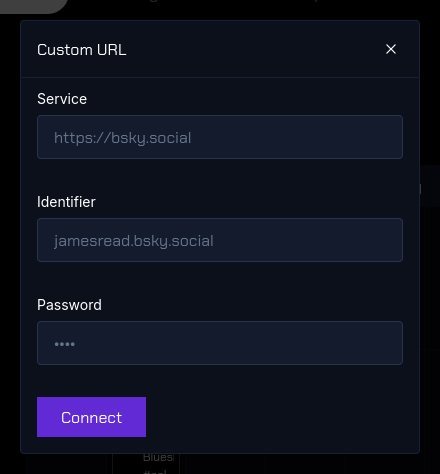
You should be redirected and be able to start posting immediately. If you have any issues, check the backend service logs.
Was this page helpful?
Yes
No
Previous
Mastodon
How to add Mastodon to your system
Next